| |||||||||||||||

How to Declutter Your Life Email as the Center of Your Organizational Universe. For several decades now, people have been talking about the "paperless office." (It was the topic of last month's Urbach Letter). We're not there yet, but there's positive movement. Email and the web are the main reasons things are getting better. In the past, the main roadblock to getting rid of paper was the fact that everything started out on paper – and had to be laboriously scanned and archived first. Nowadays nearly everything is on the web. Why keep files of vendor catalogs, for example, when the latest info is available instantly on line? The shift from faxes and letters to email as the preferred
form of business communication is probably the most important driver to the
paperless office. When info originates electronically, why convert it to paper
(i.e. print it) and then file away paper copies? So much better to get organized in
Outlook (or another email program of choice). I'm surprised that most people overlook the organizational
capabilities of their mail programs. They have one giant inbox clogged with
thousands of messages... or at the other extreme, delete everything right after
reading it. So much better to set up virtual file cabinets and drag messages
into the appropriate folder when each one arrives. Key to this is the concept of
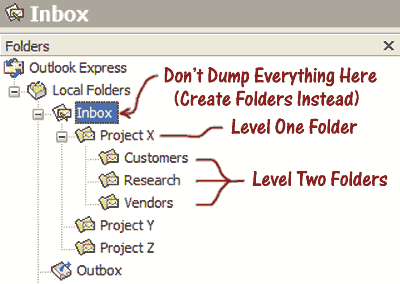
hierarchical folders. Something like this (click to enlarge): Label Everything. There's a Chinese proverb: "The palest ink is better than the strongest memory." It's way too easy to forget what's in a box or folder unless it's well marked. I label *everything* with a Brother P-Touch label maker. Some people are fine with hand-written labels on things, but us anal-retentive types prefer the sharp look and readability of Brother labels. The only slight downside is the cost of the label stock. It runs about half a dollar a foot. Still… if having everything nicely labeled and findable reduces my stress and makes me more efficient, I consider it money well spent. Know Where to Find It. I discovered something quite profound when I was an engineering student thirty years ago. As a mechanical engineer, you study how the physical world works, and there are literally tens of thousands of equations that describe the physics of the natural and manmade world. Halfway toward my undergraduate degree, I already owned over a hundred thick engineering textbooks, each densely populated with complex equations. Sure, I memorized each chapter's equations for exams, but education "fills a leaky bucket." (Over time, knowledge slowly leaks out…) However, knowing WHERE to find something is often just as good as knowing the thing. As long as I understood the concepts, and could quickly look up a reference, I'd be able to work productively. Same with my current work life. I've stopped worrying about having everything close at hand, and instead structured my work environment so that I can quickly find the obscure stuff I occasionally need to do my job well. That means having a system. Info Finding System. Here's the core of my system. It's an information hierarchy: Visible – Fingertip – Steps Away – Archived Things I'm working on at the moment remain visible to me. Whether it's a stack of work papers, a brochure, a shortcut icon on my computer screen, or whatever, I find value in having current projects "tangibilized." The next click down the hierarchy are the items that are out of sight but reachable without leaving my office chair (desk drawers, hanging files, etc.) After I've finished a project, anything related to it is consolidated and moved to the "steps away" storage area. In my case, (non-scannable) paper goes in a large file cabinet and dimensional objects go into labeled boxes that, for now, remain in my immediate work area. Every so often, I groom through the steps away storage and decide whether to retain the materials in archived storage or dispose of them. This is often a hard decision. TRAF. If you're been exposed to any organizing conventional wisdom, I'm sure you've been taught the acronym: T.R.A.F. It stands for Toss, Refer, Act, or File. As you come across work items, you must decide upon one of four actions: Toss it out, Refer it to somebody else (my favorite), Act on it immediately, or File it away for future reference. Some people swear by this system, but for me, it's a goal rather than an absolute. I just encounter too many in-between items… and you probably do too. Paper or Electronic? Last month, I went on and on about how you're better off scanning most new documents that come your way, and then organizing the resulting electronic files. You may find some of the things in this article appear contradictory. That's because this is an update to an article from way back in February of 2003. At that time, I hadn't yet gotten serious about paper reduction, and presented an elaborate way of storing documents. I decided to keep that original information intact in this update, for those readers who wish to remain paper-bound. And besides, there will always be certain actual documents that you'll want to keep around even if scanned files are accepted as "original." What to Keep. I've marked the items you can probably scan and toss/shred with an (S) in the table below. The others should be scanned and archived too, but you should keep the originals. (This is NOT a legal or tax opinion -- consult your advisor for more definitive advice)
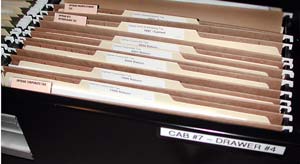
File Hierarchy: Because TRAF doesn't work that well for me, I tend to do more paper filing than perhaps I should. At least I have a good system for it. I've got a file hierarchy, and it looks like this: Cabinet # – Drawer # – File Section – Folder
Each free-standing cabinet gets a number and has a broad category. In the example, cabinet seven is for my corporate records. Each drawer also gets a number and a specific sub-category. Here, drawer number four holds tax records. Every drawer is divided into sections, as you see here, different kinds of tax records, separated by "Pentaflex hanging folder tabs." Finally, each section is populated by labeled manila folders within the hanging folders – in this case, one for each tax year.
Clean Desk Versus Messy Desk Philosophy. A lot of people I know subscribe to the messy desk philosophy at work. Whether they like it that way or not, they're afraid a clean desk telegraphs the wrong message to their boss. Namely, "I don't have enough work to keep me busy." To this, I say, "Start looking for a new job." If you don't already have a great reputation around the office for getting stuff done quickly, accurately and efficiently, hiding behind a pile of papers won't help you. Your days are numbered... Final Words. You've just seen *some* elements of my personal organizational system, but I don't expect you to adopt every strategy. Please take whatever bits and pieces you feel might be appropriate to your own situation, and use them as you see fit. Happy decluttering!
A Quiet Moment of Gasoline Nostalgia...
About Victor Urbach: About The Optran Group About Altegis
That's all for now. More next month. In the meantime, please drop me a note with feedback, suggestions, or attaboys. I'm very reachable at victor@urbachletter.com. Pass-along readers please note: If a friend forwarded The Urbach Letter to you, please Use This Link to Subscribe, and get your own complimentary personal copy delivered each month, "Hot Off the Press." Prior Urbach Letter articles are here in a searchable index: Urbach Letter Back Issue Archive. Whitelist this letter. Your Internet service provider or IT administrator can cut you off from receiving future Urbach Letter issues... without your knowledge or consent. Here are step-by-step whitelisting instructions.
|
Cool Thing of the Month
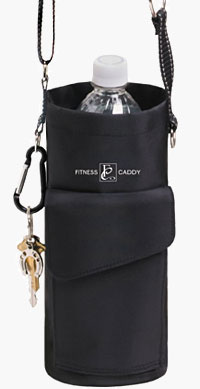
Fitness Caddy Great Plate
Thanks. Wouldn't Have Figured it Out on My Own.
The C List Caffeine: One of the four basic food groups. Calendar: An attempt, underwritten by the principal religions, to make the heavenly bodies keep regular hours. Callous: Gifted with great fortitude to bear the evils afflicting another. Calorie: Basic measure of the amount of rationalization offered by the average individual prior to taking a second helping of a particular food. Calories: Weight lifters. Campaign: A form of courtship in which rival suitors vie for the hand of a woman who has been wooed, won and abandoned countless times before. Campers: Nature's way of feeding mosquitoes. Candidate: A person who asks for money from the wealthy and votes from the poor to protect them from each other. Cannibal: One who is fed up with people. Carbage: The trash found in your automobile. Cardiology: The study of poker playing. Carpet: 1. A floor covering that is bought by the yard and worn by the foot; 2. A dog or cat who enjoys riding in a car; 3. Expensive floor covering used to catch spills and clean mud off shoes. Castrate: 1. Market price for setting a fracture; 2. Hotel room cost for actors. Cavity: Empty space ready to be stuffed with dentist's bills. Celebutard: A not very bright celebrity. Frequently used to describe Paris Hilton & Britney Spears. Celibate: An old refrain. Censor: A person who sticks his No's into other people's business. Centenarian: A person who has lived to be one hundred years old. He never smoked or he smoked all his life. He drank whiskey for eighty years or he never touched it. He was a vegetarian or he wasn't a vegetarian. Follow these rules carefully and you too can be a centenarian. Center Of Mass: The Priest. Chaperone: One who is too old to get into the game, but still tries to intercept the passes. Character: 1. That which one is called if one doesn't have any; 2. What a man is in the dark; 3. What you have left when you've lost everything you can lose. Charm: 1. The ability to make someone think that both of you are wonderful; 2. That indefinable something possessed by girls with stunning figures; 3. What one is told he has until he begins to rely on it. Cheese: Milk's leap toward immortality. Chickens: The only animals you eat before they are born and after they are dead. Childhood: 1. A happy period when nightmares occur only during sleep; 2. A wonderful time of life when all you need do to lose weight is to take a bath.
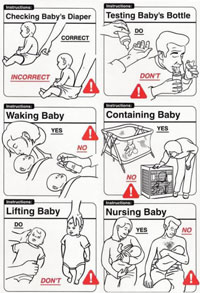
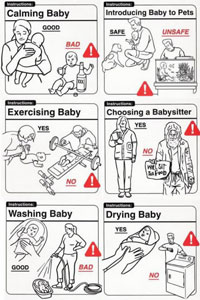
Baby Care Tips
Dog Dish
Enjoy the Urbach Letter? |


 Are you
drowning in clutter? Spending too much time searching for stuff?
Feeling like you're losing control over your work environment? You're not
alone. Most folks wish they could get better organized... but the task seems too daunting. They wonder where they'll find the time to make sense of it all,
and doubt they'll be able to come up with an organizational system they can live
with. Maybe I can help. The system I'll show you here may not be perfect, but it works very well for
me and is easily adaptable to your own personal situation. I'll concentrate
mainly on office issues. You're pretty much on your own when it comes to
organizing your clothes closet, garage, attic, etc. – although I'll point you in
the right direction.
Are you
drowning in clutter? Spending too much time searching for stuff?
Feeling like you're losing control over your work environment? You're not
alone. Most folks wish they could get better organized... but the task seems too daunting. They wonder where they'll find the time to make sense of it all,
and doubt they'll be able to come up with an organizational system they can live
with. Maybe I can help. The system I'll show you here may not be perfect, but it works very well for
me and is easily adaptable to your own personal situation. I'll concentrate
mainly on office issues. You're pretty much on your own when it comes to
organizing your clothes closet, garage, attic, etc. – although I'll point you in
the right direction.